Ladders
Linked video: Tutorial: Creating Ladders in Narrative Pro
Narrative Pro features a complete ladder package system for creating and managing ladders.
Usage
Drag the BP_Ladder blueprint into the scene and position it where you want. The root of the ladder is configured at ground level.

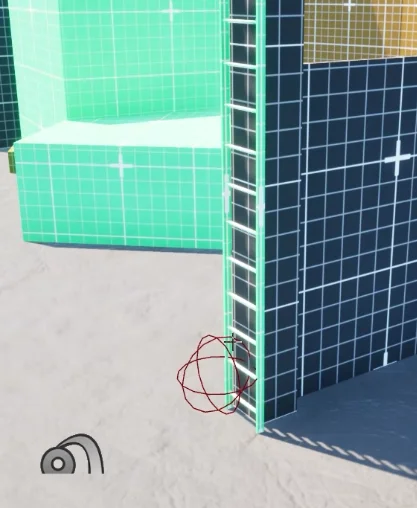
Configure the number of Ladder Rungs to make it extend to the height of your climbing area.
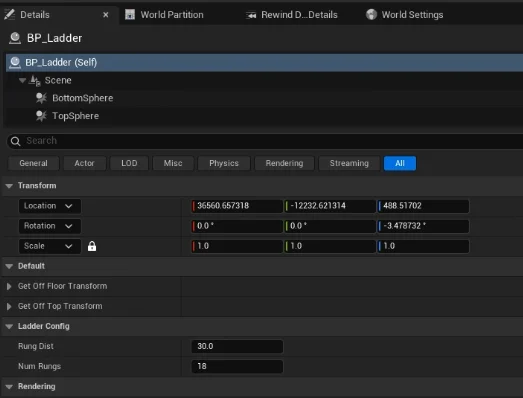
Locations
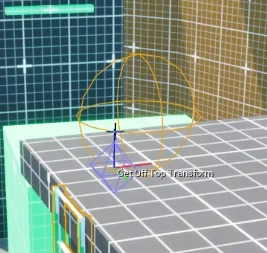
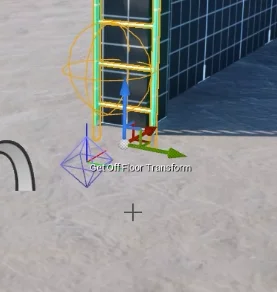
Sometimes your terrain may not be flat, so you can adjust the ladder's get on / off locations by modifying the transforms.
If you don't position the locations correctly (get on / off transform, get off floor / off top transforms) the animations can glitch out and look odd.
If you see some warping through meshes or into the ground, move you locations around.
NPCs
NPC's have been set up to automatically use ladders when they need to get to an area.
Ladders use custom NavLinks in order to join the base and top of a ladder.
When an NPC arrives at a NavLink, the custom code starts telling them to climb the ladder exactly how the player does.
How it works
Ladders are built up via a blueprint (BP_Ladder) using mesh instances to extend the ladder.
Each ladder has a start and end sphere collision component to detect if the player walks into or near the top of a ladder.
The player also fires a trace to detect the ladder when jumping into it.
When detected, a motion warp activates connecting the player to the ladder and activating the climbing mode.
As the player moves up / down, the system moves the player up and down each ladder segment.