Conditions
Conditions are a powerful tool that allows you to control the flow of dialogue or events based on any condition you require.
They are small portions of code (mainly generic and reusable, but they can also be specific) that allow you to check a value and have it act as the gate to the next dialogue node to enter, dialogue line to pick or what events to run.
- Should pick a line only be used if the player has a specific item? Add a condition.
- Do you want to only go down a nodes-route if the player has completed a quest? Add a condition.
- Want to only play a node a single time? Add a condition.
- Want to only pick a line if it's a time of day? Add a condition.
Conditions allow you to add multiple queries to a bunch of places in dialogue. All of these conditions must be met for it to be considered for proceeding.
If even one is not met, the node will be rejected for use. If you require "this or that" logic, use two nodes instead.
Quest conditions currently do not work. You can archive the same result using branches.
It has been left here since there is a discussion in the community to whether it should be made available or not.
Using Conditions
To add a condition, simply select the node/line/event and in the details panel and add as many conditions to your Conditions list as you require.
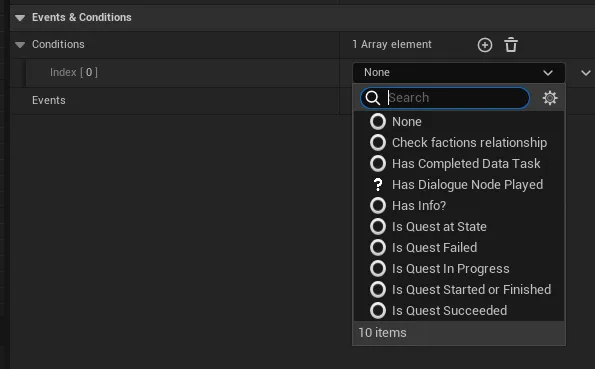
Default Conditions
Narrative comes with a bunch of default conditions to help kickstart your game.
Creating Conditions
It is very common to create your own conditions to implement logic. This could be to interface with other plugins or to do something unique for your game.
Creating Conditions is really easy. Create a new condition by right-clicking in the Content Drawer -> Narrative -> Condition.
Simply override CheckCondition and action your request.
A key thing to remember with Conditions is to always make it return true or false. If you don’t, it can cause issues with Narrative waiting for the condition to finish.
If you return true, it will allow the node to be used. If you return false, it will look for another node, otherwise end the dialogue.
You do not need to build a NOT / invert for your condition. Narrative Conditions build this in by default.
Properties
| Name | Type | Description |
|---|---|---|
| Not | Bool | Inverts the result of the condition when executed. |
| Party Event Policy | EPartyEventPolicy | Defines how events should be executed when the dialogue is playing as a party. Ignore if not in a party. |
EPartyEventPolicy
| Enum Value | Display Name | Description |
|---|---|---|
| Party | Party | The condition is run on the party itself. Use this if you want the condition to check anyone in the party. |
| AllPartyMembers | All Party Members | The condition is run on every party member. Use this if you want the condition to check every single party member. |
| PartyLeader | Party Leader | The condition is run on the party leader. Use this if you want the condition to just check the leader. |